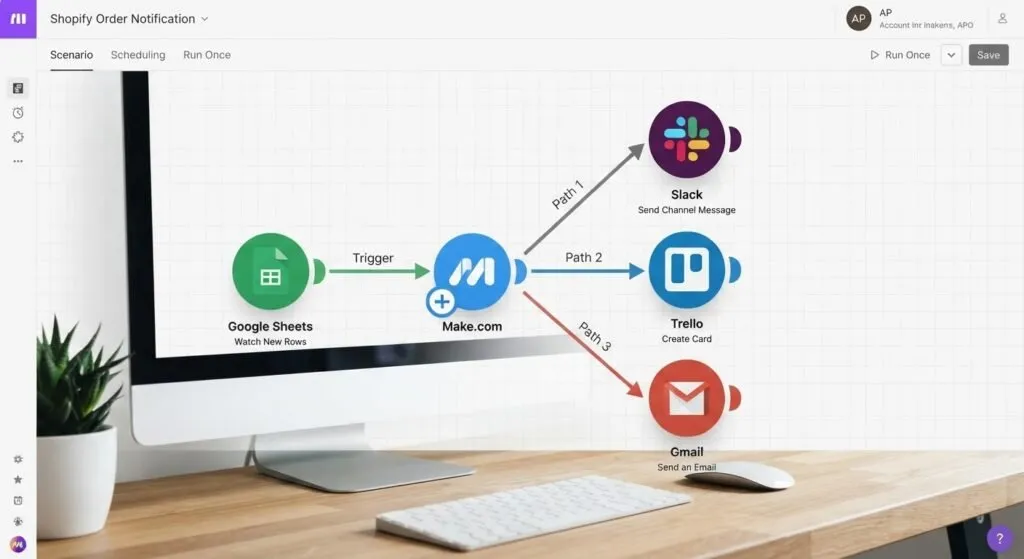
If you’ve ever wished your business software could communicate with each other automatically, you may have wondered: What is Make.com?
Make is a visual automation platform that allows you to connect applications, move information between them, and build automated workflows without traditional programming.
Instead of manually copying information from one application to another, you can create a workflow that does the work automatically.
For example:
New website lead
→ Add customer to CRM
→ Analyze the lead
→ Send notification
→ Create follow-up task
→ Send personalized email
That’s the basic idea behind Make.
But the platform can go much further than simple app connections.
Make currently describes itself as a visual AI automation platform and supports more than 3,000 integrations. It also provides tools for building AI-powered workflows and AI agents. (Make)
So, how does Make actually work?
Let’s break it down.
What Is Make.com?
Make is a visual automation platform that lets users connect applications and create workflows.
The platform was previously known as Integromat before becoming Make.
The basic concept is straightforward:
When something happens, automatically perform a series of actions.
Those automated workflows are called scenarios.
A scenario can connect multiple applications and determine what information should move between them.
For example, a simple business scenario could look like:
New form submission
↓
Create CRM contact
↓
Send email
↓
Notify sales team
Instead of an employee manually performing those actions, Make can execute the workflow automatically.
Make describes a scenario as a workflow made up of modules that automate applications and services. (Make)
That visual approach is one of the platform’s biggest advantages.
How Does Make.com Work?
Make works by connecting individual steps together.
Each step is represented by a module.
A module might:
- Receive information
- Create a record
- Update a record
- Search for information
- Send an email
- Call an API
- Process data
- Use an AI model
- Trigger another workflow
You connect these modules together to create a scenario.
For example:
Gmail
↓
AI analysis
↓
Google Sheets
↓
Slack
The workflow could automatically read an incoming email, have AI determine what the email is about, record the information in a spreadsheet, and notify someone on Slack.
The possibilities depend largely on the applications and processes you’re connecting.
What Is a Make Scenario?
A scenario is simply Make’s name for an automated workflow.
Think of a scenario as a digital assembly line.
Information enters at one end.
Your workflow processes it.
The finished result comes out the other side.
For example, imagine a company receives a new lead through its website.
The scenario might be:
Website form
↓
Check CRM
↓
Is this an existing customer?
↙️ ↘️
Yes No
↓
Update record Create record
↓
AI lead analysis
↓
Assign salesperson
↓
Send notification
↓
Create follow-up task
That entire process can be represented visually inside Make.
This is why Make is particularly useful when a workflow involves more than two or three steps.
What Are Make Modules?
Modules are the building blocks of a Make scenario.
Each module performs a specific function.
For example, a module might tell Make to:
Create a contact
Search a database
Send an email
Update a spreadsheet
Generate AI content
Send an HTTP request
Create a task
You connect these modules together to create a larger process.
Think of modules like building blocks.
One block by itself may not accomplish much.
But when you connect dozens of blocks together in the right order, you can create a sophisticated system.
What Is Data Mapping in Make?
One of the most important concepts for beginners is data mapping.
Data mapping determines where information from one module goes in another module.
Imagine a customer fills out a form.
The form collects:
- First name
- Last name
- Phone number
- Company
Your next module creates a CRM contact.
You can map the form’s:
First Name
into the CRM’s:
First Name
You can then map:
into:
and:
Phone
into:
Phone
Make moves the information between the applications according to those mappings.
This is one of the fundamental concepts behind workflow automation.
Once you understand data mapping, building scenarios becomes much easier.
What Can You Automate With Make?
This is where Make becomes interesting.
You can use it to automate many different business processes.
Examples include:
Lead Management
New lead
→ Check CRM
→ Analyze lead
→ Score lead
→ Notify salesperson
→ Create follow-up
Customer Onboarding
New customer
→ Create customer record
→ Send welcome email
→ Create project
→ Create tasks
→ Notify team
Marketing
New blog post
→ Generate social content
→ Schedule posts
→ Update content database
→ Notify marketing team
Sales
New sales opportunity
→ Update CRM
→ Calculate information
→ Notify sales representative
→ Create follow-up
Finance
New invoice
→ Record invoice
→ Update accounting system
→ Notify customer
→ Track payment status
Internal Operations
New task
→ Update project management system
→ Notify employee
→ Update reporting dashboard
The important point is that Make doesn’t require every process to follow the same template.
You design the workflow around your business.
Can Make.com Use AI?
Yes.
AI has become an increasingly important part of Make.
Make currently supports AI applications and allows users to incorporate AI into workflows. Its platform also includes AI agents that can operate within the same visual environment as automation scenarios. (Make)
That means Make can be used for workflows such as:
Incoming customer message
↓
AI classification
↓
Determine priority
↓
Route to department
↓
Generate response
↓
Update CRM
AI can also help with tasks such as:
- Classifying information
- Summarizing documents
- Extracting data
- Generating content
- Analyzing customer feedback
- Enriching records
- Routing requests
- Making context-dependent decisions
Make’s current AI automation offering includes hundreds of AI-related integrations and supports connecting AI models directly into workflows. (Make)
What Are Make AI Agents?
AI automation and AI agents aren’t exactly the same thing.
Traditional automation generally follows instructions you’ve already defined.
For example:
When a customer submits a form → create a CRM record.
An AI-powered workflow can add intelligence to one or more steps.
An AI agent goes further.
Instead of following only a predetermined sequence, an agent can interpret a goal, determine which tools it needs, and choose actions based on the situation.
Make has integrated its AI agent capabilities directly into its visual scenario environment, allowing users to build, run, and debug agents alongside their workflows. (Make)
That creates an interesting combination:
Automation provides the structure.
AI provides adaptive decision-making.
Together, they can create much more sophisticated business processes.
What Apps Can Make Connect?
Make is designed to connect applications across a business.
Make currently advertises more than 3,000 pre-built app integrations. (Make)
Depending on the applications you’re using, you can connect systems involving:
- CRM
- Marketing
- Accounting
- Project management
- Spreadsheets
- Databases
- Communication
- E-commerce
- Customer support
- AI
- Forms
- Advertising
Make also provides tools for connecting custom systems through APIs and other methods.
This is important because businesses rarely operate with one application.
A typical company might have one tool for sales, another for accounting, another for communication, another for scheduling, and another for customer management.
Automation connects those systems.
What Is the Difference Between Make and Traditional Software?
Traditional software generally requires a person to interact with it.
For example:
An employee receives an email.
They open the CRM.
They copy information.
They create a customer record.
They send a notification.
They create a task.
They update a spreadsheet.
That’s a lot of manual work.
Automation changes the process.
Instead:
Email arrives
↓
Make detects it
↓
Information is extracted
↓
CRM is updated
↓
Task is created
↓
Team is notified
The employee only needs to get involved when human judgment is actually necessary.
That’s the real value of automation.
Is Make.com No-Code?
Make is generally considered a no-code automation platform.
You don’t need to write traditional software code to create many workflows.
Instead, you use a visual builder and configure modules.
However, “no-code” doesn’t mean “no learning required.”
As your scenarios become more advanced, understanding concepts such as:
- Data structures
- APIs
- Webhooks
- JSON
- Variables
- Conditional logic
- Error handling
can become extremely useful.
You don’t need to become a professional programmer.
But understanding how information moves through software will make you significantly better at building automation.
Is Make.com Good for Small Businesses?
Yes.
In fact, small businesses can have some of the strongest reasons to use automation.
A large corporation may have entire departments dedicated to administrative tasks.
A small business usually doesn’t.
The owner might be responsible for:
- Sales
- Customer service
- Scheduling
- Marketing
- Operations
- Administration
- Follow-up
Automation can reduce the amount of repetitive work those people have to perform.
For example, a small HVAC company could create a workflow that:
Receives website inquiry
→ Determines service type
→ Checks customer record
→ Creates or updates CRM contact
→ Notifies office
→ Creates follow-up
→ Sends customer confirmation
Instead of someone manually moving information through multiple systems, the workflow handles the repetitive steps.
Make.com Automation Examples
Here are some practical examples of what businesses could build.
Example 1: Lead Follow-Up
Website form
→ Make receives submission
→ CRM record created
→ AI analyzes lead
→ Lead assigned a score
→ Salesperson notified
→ Personalized email generated
→ Follow-up task created
This can turn a manual lead-management process into an automated pipeline.
Example 2: Customer Support
Customer email
→ AI analyzes message
→ Determine category
→ Determine urgency
→ Search customer record
→ Route to appropriate employee
→ Create support ticket
→ Notify customer
This allows employees to focus on solving problems instead of sorting messages.
Example 3: Content Marketing
New article published
→ Generate social media variations
→ Save content
→ Schedule posts
→ Notify marketing team
→ Update content calendar
One piece of content can trigger an entire marketing workflow.
Make Templates Can Help You Get Started
You don’t necessarily have to build every automation from scratch.
Make provides scenario templates that can serve as starting points for workflows.
Its template library covers thousands of use cases, and templates can be customized to fit your own processes. (Make Help Center)
That’s particularly useful for beginners.
Instead of starting with a blank canvas, you can find a workflow that’s similar to what you want to accomplish and modify it.
This is one of the best ways to learn.
Start with a template.
Understand what each module does.
Change one part.
Run the scenario.
Then gradually build your own workflows.
How Much Does Make.com Cost?
Make offers multiple plans designed for different levels of usage.
The right plan depends on factors such as:
- Number of workflows
- Automation volume
- Number of users
- Features required
- Data processing requirements
- AI usage
Make also offers a free plan, allowing users to experiment with the platform before committing to a paid subscription. (Make)
For someone learning automation, starting with the free option can make sense.
Build a simple scenario.
Test it.
Understand how the platform works.
Then decide whether you need additional capacity.
Is Make.com Worth Learning?
For anyone interested in business automation, yes.
The more software a business uses, the more opportunities there are for disconnected systems and repetitive manual work.
Learning Make gives you a way to connect those systems.
More importantly, learning automation changes how you think about business processes.
Instead of simply asking:
“How do I complete this task?”
you start asking:
“Which parts of this task actually require a human?”
That’s a powerful shift.
The goal isn’t to replace people.
The goal is to eliminate unnecessary manual work so people can focus on work that actually requires judgment, creativity, relationships, and decision-making.
Make.com Pros and Cons
Pros
- Visual workflow builder
- Large app ecosystem
- Advanced workflow capabilities
- Strong data manipulation
- Conditional logic
- AI integrations
- AI agent capabilities
- Templates for common use cases
- API and webhook capabilities
- Suitable for simple and advanced automation
Cons
- More complicated than some beginner-focused automation tools
- Steeper learning curve
- Advanced workflows can become difficult to manage without good organization
- Complex scenarios require careful testing
- Understanding data mapping takes time
Make isn’t necessarily the right tool for everyone.
If you only need a basic two-step automation, a simpler platform may be enough.
But if you want to build sophisticated business automation, the additional flexibility can be extremely valuable.
How to Get Started With Make.com
The best way to learn Make is to start small.
Don’t try to automate your entire business on day one.
Instead, identify one repetitive process.
Ask yourself:
What do I do every day that follows the same basic steps?
Maybe it’s:
- Moving leads into a CRM
- Sending follow-up emails
- Creating tasks
- Updating spreadsheets
- Sending notifications
- Organizing customer information
Start there.
Build one scenario.
Test it.
Improve it.
Then automate the next process.
Over time, those individual workflows can become a connected automation system.
Ready to Try Make?
If you’ve been asking what is Make.com because you’re interested in automating your business, the easiest way to understand the platform is to actually build something with it.
**Start Automating With Make**
Disclosure: This article contains an affiliate link. If you sign up for Make through our link, we may earn a commission at no additional cost to you.
Start with one simple workflow.
You don’t need to automate everything.
You just need to find one repetitive process that doesn’t need to be done manually anymore.
Once you see that first workflow run successfully, you’ll understand why automation can become such a powerful part of a modern business.
Frequently Asked Questions
What is Make.com used for?
Make.com is used to connect applications and automate business workflows. It can move data between systems, trigger actions, process information, and incorporate AI into automated processes.
Is Make.com free?
Make offers a free plan that allows users to start experimenting with automation. Paid plans provide additional capacity and features.
Is Make.com difficult to learn?
Make has a steeper learning curve than some simpler automation tools. However, beginners can start with templates and simple scenarios before moving into more advanced functionality.
Do I need to know how to code to use Make?
No. Make is designed as a visual, no-code automation platform. However, learning basic concepts such as APIs, webhooks, and data structures can help you build more advanced workflows.
Can Make.com use ChatGPT?
Make supports AI applications and can incorporate AI models into automation workflows. This allows businesses to use AI for tasks such as classification, content generation, summarization, and data processing.
Can Make.com automate my entire business?
Make can automate many business processes, but you shouldn’t try to automate everything. The best starting point is identifying repetitive, predictable processes where automation can save significant time.
Is Make.com better than Zapier?
It depends on your needs. Zapier is generally easier for beginners and simple workflows, while Make provides more flexibility for complex automation. For a detailed comparison, see our Make vs. Zapier comparison****.
Related Articles
- Make vs. Zapier: Which Is Better for Automation? — Compare the two leading automation platforms.
- Make.com Just Changed the Automation Game: 7 New AI Features — See what’s new in Make’s AI agent and automation capabilities for 2026.